사설(회사,학교) 방화벽 하에서 원격 허용
학교로 들어오는 포트들을 다 막았기 때문에
밖(집)에서 학교 컴퓨터로 접속하지 못한다.
그러나 반대로 학교에서 나가는 포트는 막아 놓지 않았기 때문에 꼼수를 사용할 수 있다.
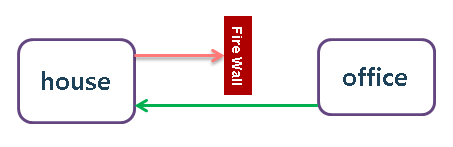
Even if you want to connect your office PC outsideof your office, but you can't because of your office firewall.
Then you can try this.
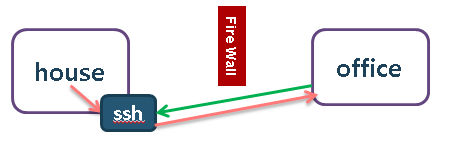
1. install "freesshd"
2. add user (in house PC)
Users -> add user -> check "Shell, Tunneling"
Tunneling -> check 'Allow local, remote port forwarding'
3. make tunnel to house (in office PC)
I am using Xshell, you may use putty.
○ new section
- connection
- host : _houseip
- port : set in freessshd ssh port(22)
- connection - ssh -tunneling
- type : remote
- source : _houseip
- listening port : _anyport100
- host : localhost
- destination port : _destport3389
then, you can check forwarding is established (opened).
4. move into tunnel (in house PC)
connect remote desktop to 'localhost:_anyport100'
It will be connect
house:_anyport100 -> ssh tunnel -> office:_destport3389
작성하고 나니깐
http://www.ibm.com/developerworks/aix/library/au-tunnelingssh/index.html
이거랑 비슷한듯;;